







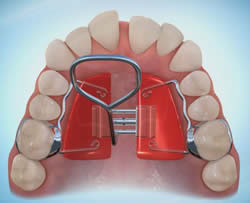
1. How do I turn the expander?
There should be one hole visible, towards the front of the mouth. Carefully insert the key into the hole and gently wiggle the key to ensure that it is fully seated.
While keeping the key securely in the hole, push toward the back of the mouth (in the direction of the arrow on the expander), until the next key hole is visible at the front of the mouth. Remove the key by wiggling it down toward your tongue, and be careful not to “unturn” the screw. Gently remove the key from the mouth.
2. I can’t find the hole at the front of the expander.
It is likely that the previous activation was not complete or the screw has unturned.
To correct this, insert the key into the hole facing the back of the expander and continue the activation until the next hole is completely visible at the front of the mouth. To ensure that you stay on schedule, you should then perform another complete activation.
3. The expander seems to be loose on one side.
If you think the expander may be loose, stop activating. Please call the office immediately and schedule an appointment to have it checked and re-cemented, if needed. Keep the area clean until we can examine it.